How to Start Clipping in 2026: Whop, Pay, Tools
How to start clipping in 2026: how Whop clipping pays, how much clippers make, the views you need per $100, the rules, and a 9:16 workflow you can copy.
 Simone MatthewContent & video creator at Tube Snip·Updated · 9 min read
If you are wondering how to start clipping, here is the short version: you take the best moments of long videos (podcasts, streams, interviews), turn them into vertical 15–60 second clips, and post them where short videos get views. Brands and creators pay clippers for those views. This guide shows how clipping works in 2026, what Whop clipping pays, the real math behind "how much do clippers make", and a workflow you can copy today.
I tested the editing part myself in Tube Snip's clip editor, and every pay figure below links to where it comes from. Nothing here is a promise of income.
What content clipping is (and why people pay for it)
Content clipping means cutting short, standalone moments out of long videos. A two-hour podcast might hold ten moments that work on their own: a strong opinion, a funny story, a clear tip. Clipped and posted on TikTok, Instagram Reels and YouTube Shorts, those moments reach people who would never watch the full episode.
That reach is why creators and brands pay. More clips in more feeds means more people find the show, the product or the stream. Some hire a clipping agency, some hire freelance clippers, and many now post open campaigns where anyone can clip and get paid per view.
There are three common ways a clipper earns:
- Per-view campaigns. A brand funds a budget and pays a fixed amount for every 1,000 views your clip gets. Whop Content Rewards is the best-known example.
- Freelance work. A creator pays you per clip or per month to edit their content.
- Your own clip channel. You run a page in one niche and earn from platform payouts and sponsors later. This is the slowest path.
How to start clipping in 6 steps
- Pick one niche you already watch. Business podcasts, gaming streams, fitness, finance, motivational talks. You will spot good moments faster in a world you know.
- Study 20 viral clips in that niche. Note the first sentence of each one (the hook), the length and how the captions look. Copy the structure, never the clip.
- Find a paid source of videos. Join a clipping campaign or ask a creator for permission. Clipping videos you have no rights to is the fastest way to get accounts struck and payouts refused.
- Cut the moment. Paste the video link into a YouTube clip cutter, set the start and end to the tenth of a second, and keep it between 15 and 60 seconds.
- Make it vertical and readable. Export 9:16 for each app, keep the speaker in frame and burn in captions so it works with the sound off.
- Post, submit, review. Post on your own account, submit the link to the campaign, and check after 48 hours which hooks held viewers.
That is the whole loop. Most of the skill is in step 2 and step 4: picking moments that hook in the first two seconds.
How Whop clipping works
Whop is a marketplace and payments company. Its clipping program, called Content Rewards (earlier "Whop Clips"), connects brands that want views with people who make clips. According to Whop's guide to clipping, a brand creates an offer such as $3 per 1,000 views, funds it, and clippers sign up, post content and get paid once the brand reviews it.
How to use Whop clipping, in practice:
- Create a Whop account and open Content Rewards.
- Pick a campaign that fits your niche and read its rules: which videos you may clip, which platforms count, the pay per 1,000 views and what gets a clip rejected.
- Download or open the source video the campaign allows.
- Cut and post your clip on your own TikTok, Instagram or YouTube account.
- Submit the post link in the campaign so the views can be tracked.
- Get paid for approved views from the campaign's budget.
Two things beginners miss: a campaign's budget is finite, so popular ones fill up, and the brand decides what is approved. A clip that breaks the rules earns nothing, however many views it gets.
Is Whop clipping legit?
Yes, it is a real program run by a real company, and brands do pay out. In its own Whop Clips announcement, Whop said the YouTube clip content type paid $1 per 1,000 views at the time. Rates change by campaign, so treat any number you read as a snapshot.
Legit does not mean easy money, though. Expect these:
- Rejections. Clips that ignore the campaign's rules, reuse another clipper's edit or hide the brand get rejected.
- Budgets run out. When a campaign is spent, new views stop paying.
- Views take time. Most short clips get a few hundred views. A handful get far more.
If anyone asks you to pay a fee to join a clipping job that "can't lose", walk away. Real campaigns pay you; you do not pay them.
How much do clippers make? The math
Pay per 1,000 views is called CPM. It is the number that decides everything, so here is how many views you need to earn $100 at different rates:
| Pay per 1,000 views | Views for $100 | Where you see rates like this |
|---|---|---|
| $3.00 | 33,334 | Example brand offer in Whop's guide |
| $1.00 | 100,000 | Whop's YouTube clip rate at launch |
| $0.50 | 200,000 | Lower-budget campaigns |
| $0.06 | about 1.7 million | Upper end of TikTok and Shorts creator payouts, per Whop |
| $0.01 | 10 million | Lower end of those platform payouts |
The last two rows explain why clippers chase brand campaigns instead of platform payouts alone: the platforms pay far less per view.
What do real clippers earn? Whop's guide gives these ranges: freelance clippers make $5 to $500+ per video, part-time beginners can reach about $200 to $500 a month for a few hours a week, and experienced clippers with their own channels or an agency can pass $10,000 a month. Those are Whop's numbers for its own program, and most beginners start at the low end.
Our test: three vertical clips from one moment
The editing part is where beginners lose time, so I timed the workflow in Tube Snip with an 18:42 video.
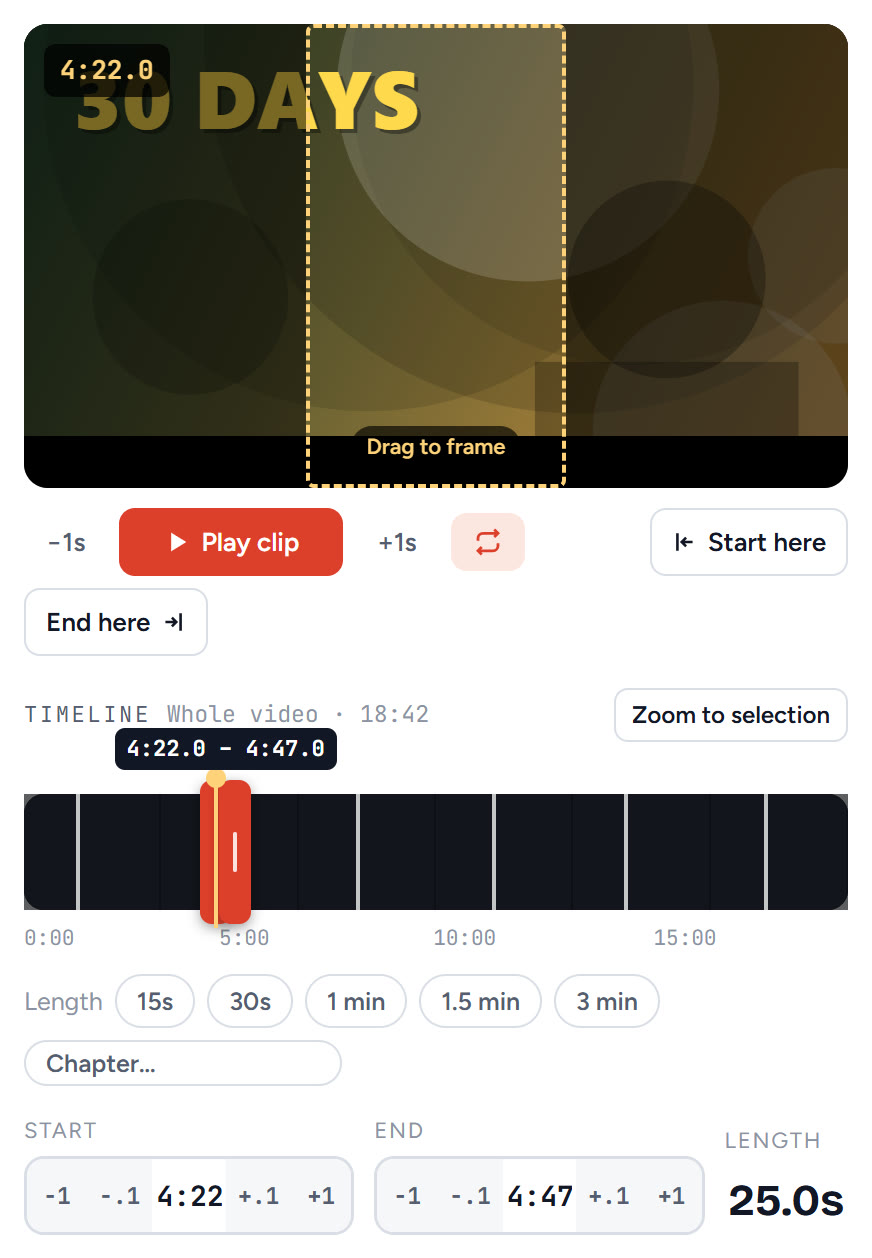
I dragged the handles to a 25-second moment (4:22 to 4:47) and nudged the start and end by a tenth of a second until the sentence started cleanly. The dashed box on the video is the 9:16 frame: drag it to keep the speaker in view.
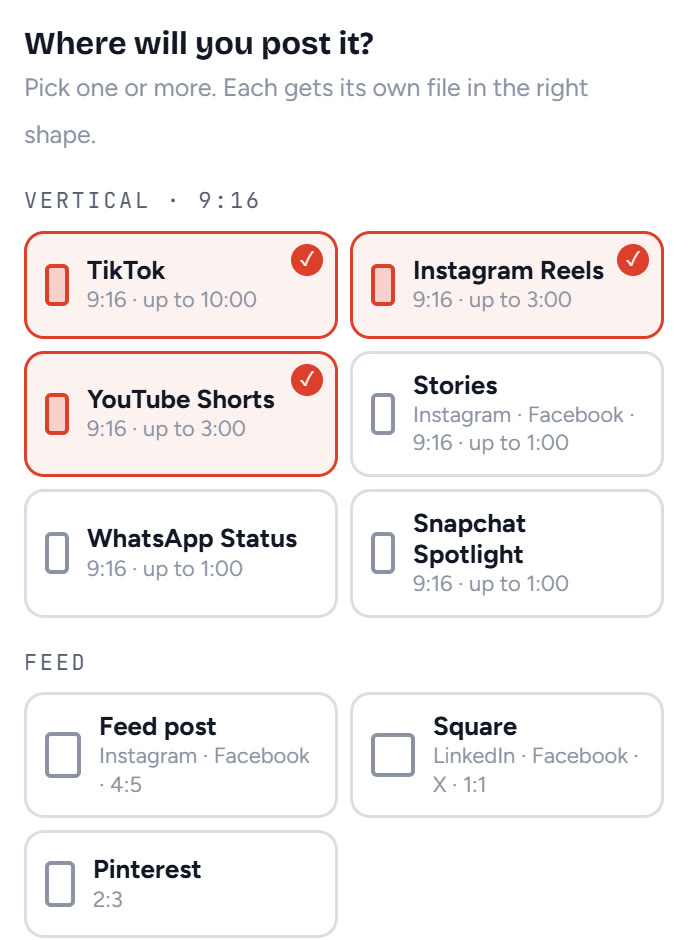
Then I picked TikTok, Instagram Reels and YouTube Shorts: three taps, and each platform gets its own 9:16 file in the right shape. TikTok allows up to 10 minutes, Reels and Shorts up to 3, but for paid clipping, 20 to 60 seconds is where views come from.
If the video has subtitles, switch on Burn in captions and the clip gets white subtitles with a black outline, placed higher on vertical clips so app buttons do not cover them.
Finding moments worth clipping
The clip that wins is rarely the most important part of a video. It is the part that makes a stranger stop scrolling. Look for:
- A strong claim in the first sentence ("Most people get this wrong").
- A number or result ("We went from 0 to 10,000 in a month").
- A story with a twist in under a minute.
- A clear, useful tip someone can use today.
On long videos, reading is faster than watching. A YouTube transcript lets you search for words like "never", "secret" or "mistake" and jump straight there. If you clip your own long videos, the Shorts ideas finder points to the three strongest moments with a timestamp and a caption idea (it is part of the Creator and Studio plans).
How to start clipping on TikTok, YouTube and Instagram
The same clip works everywhere, but each app rewards slightly different things:
| App | Length that works for clips | What helps |
|---|---|---|
| TikTok | 20–60 seconds | Fast hook, on-screen text, posting daily |
| YouTube Shorts | 20–60 seconds (up to 3 min allowed) | A clear title, a loop-friendly ending |
| Instagram Reels | 15–45 seconds | Clean captions, a strong cover frame |
Start with the app you use most yourself. You already know what feels native there.
The rules: permission, disclosure and reused content
This is where many clippers lose accounts, so it is worth two minutes.
- Permission. Clip your own videos, Creative Commons videos, or videos a campaign or creator lets you use. A campaign's rules are your permission, but only for the videos and platforms it lists.
- Disclosure. When a brand pays you to post, say so. The US Federal Trade Commission's guide for influencers treats payment as a material connection that needs a clear disclosure, such as #ad or the app's paid-partnership label.
- Reused content on YouTube. If you want YouTube's own ad money on your channel, know that YouTube reviews commentary, clips and compilations under its reused content policy. Adding your own commentary, context or editing matters there.
Where to find clipping jobs
Clipping jobs come in four places, from easiest to hardest to get:
- Open campaigns. Whop Content Rewards lists campaigns anyone can join. No interview: your clips are your application.
- Creators' own communities. Many streamers and podcasters run a Discord or a newsletter where they post clipper jobs or clipping contests. Ask before you clip, and keep the reply.
- Freelance marketplaces. Search for "clipper", "short-form editor" or "podcast clips" on freelance sites. Put 5 sample clips in your profile before you bid.
- A clipping agency. Agencies hire clippers to work on several creators' accounts. They pay a steadier rate per clip, and they expect speed and a portfolio.
Whichever you choose, keep a simple portfolio: a page or a folder with your 10 best clips, the views each got, and the source you were allowed to clip. Clipper jobs that pay well go to people who can show results, not people who say they are fast.
A weekly routine for a clipping side hustle
If you have five to seven hours a week, this routine works well for a clipping side hustle:
- Monday (1 hour): pick 2 campaigns, read their rules, collect 5 source videos.
- Tuesday to Thursday (30 minutes a day): cut and post one clip a day per app.
- Friday (1 hour): check which hooks held viewers past 3 seconds, and write down why.
- Weekend (1 hour): clip the best moment of the week again with a new hook.
One clip a day, every day, beats ten clips once a month. The algorithm learns what your account is about.
Red flags and mistakes to avoid
- Paying for a "clipping job" or a course before you have posted a single clip.
- Promises of fixed income: views, not effort, decide pay.
- Clips without captions: most short video is watched with the sound off.
- Long intros: if nothing happens in the first second, the viewer is gone.
- Posting one clip and stopping. Clipping is a numbers game for the first month.
How to become a clipper this week
Pick a niche today, read the rules of one campaign tomorrow, and post your first clip the day after. Cut it with a free clip cutter, export 9:16 for each app, add captions, and submit the link. After two weeks of daily clips you will know more about what works in your niche than any course can tell you.
If you also want the full source video saved for reference, the YouTube video downloader keeps it in HD with sound. Only save videos you have the right to use.
Questions
How do I start clipping with no experience?
Pick one niche you already watch, join one paid clipping campaign, and post one vertical clip a day for two weeks. Use a free clip cutter, keep clips under 60 seconds, add captions, and study which hooks get views before you buy any course or software.
How much do clippers make?
It varies a lot. Whop's own guide puts part-time beginners at about $200 to $500 a month and freelance clippers at $5 to $500+ per video. Campaigns usually pay per 1,000 views, so one clip that takes off can earn more than a month of small ones.
Is Whop clipping legit?
Yes, it is a real program run by Whop, a payments and marketplace company: brands fund a campaign, clippers submit posts, and approved views get paid from that budget. Clips can be rejected and budgets can run out, so read each campaign's rules before you start cutting.
How do I use Whop clipping?
Sign in to Whop, open Content Rewards, pick a campaign, and read its rules: which videos you may clip, which platforms count and the pay per 1,000 views. Post your clip on your own account, then submit the post link in the campaign so its views can be tracked and paid.
Do I need permission to clip someone else's videos?
Yes. Clip videos you own, videos under a Creative Commons license, or videos a campaign or creator gives you permission to use. Paid campaigns are that permission, but only for the videos and platforms they list.
Do I have to say a clip is paid?
If a brand or creator pays you to post it, yes. The US FTC treats payment as a material connection, so add a clear disclosure such as #ad or the platform's paid-partnership label.
Can I start clipping on TikTok and YouTube at the same time?
Yes. Cut the moment once and export one 9:16 file per app. TikTok allows clips up to 10 minutes and Reels and Shorts up to 3 minutes, but most clips that get paid views are 20 to 60 seconds.