YouTube Clip Button Gone? A Free Alternative That Works
The YouTube Clip button was removed for viewers in April 2026. See what Share at timestamp can and can't do, and how to cut a clip with a start and end.
 Simone MatthewContent & video creator at Tube Snip· · 4 min read
Looking for the YouTube Clip button and can't find it? Is your YouTube clip button missing on your phone or computer? You are not doing anything wrong. In April 2026 YouTube stopped letting viewers make new clips. The YouTube Clip button is gone for most people, and the "Share at timestamp" option took its place. This page explains what changed, what the replacement can and can't do, and how to save just the part of a video you need.
What happened to the YouTube Clip button
The Clip button let anyone pick a start and an end point (5 to 60 seconds), add a title, and share a link to only that part of a video. In April 2026 YouTube began removing it for viewers. Clips that people already made still play, but nobody can create new ones from the watch page. So where did the clip button go on YouTube? For viewers, it is simply gone. 9to5Google and Android Authority both reported the change.
Why did YouTube remove the clip button? YouTube said it wants people to share moments with timestamps instead, and it is moving clipping into Shorts and Studio. Creators still have a clip tool inside YouTube Studio, but it only works on their own videos. If you are a viewer, a student, a podcaster quoting a guest, or a clipper working for a creator, the old button is simply not there any more.
Share at timestamp: what it does and what it doesn't
YouTube's replacement is "Share at timestamp". Open Share, switch on the time option, and the link starts the video at that second.
That helps, but it is not the same thing:
| Old Clip button | Share at timestamp | |
|---|---|---|
| Start point | Yes | Yes |
| End point | Yes | No, the video keeps playing |
| Title on the shared part | Yes | No |
| Save the part as a file | No | No |
| Vertical 9:16 for Shorts | No | No |
So if you need the part to stop at a set point, or you want a file you can post or keep, a timestamp link is not enough.
How to cut a YouTube clip without the Clip button
Here is the way we do it with the Tube Snip clip cutter. It takes about a minute.
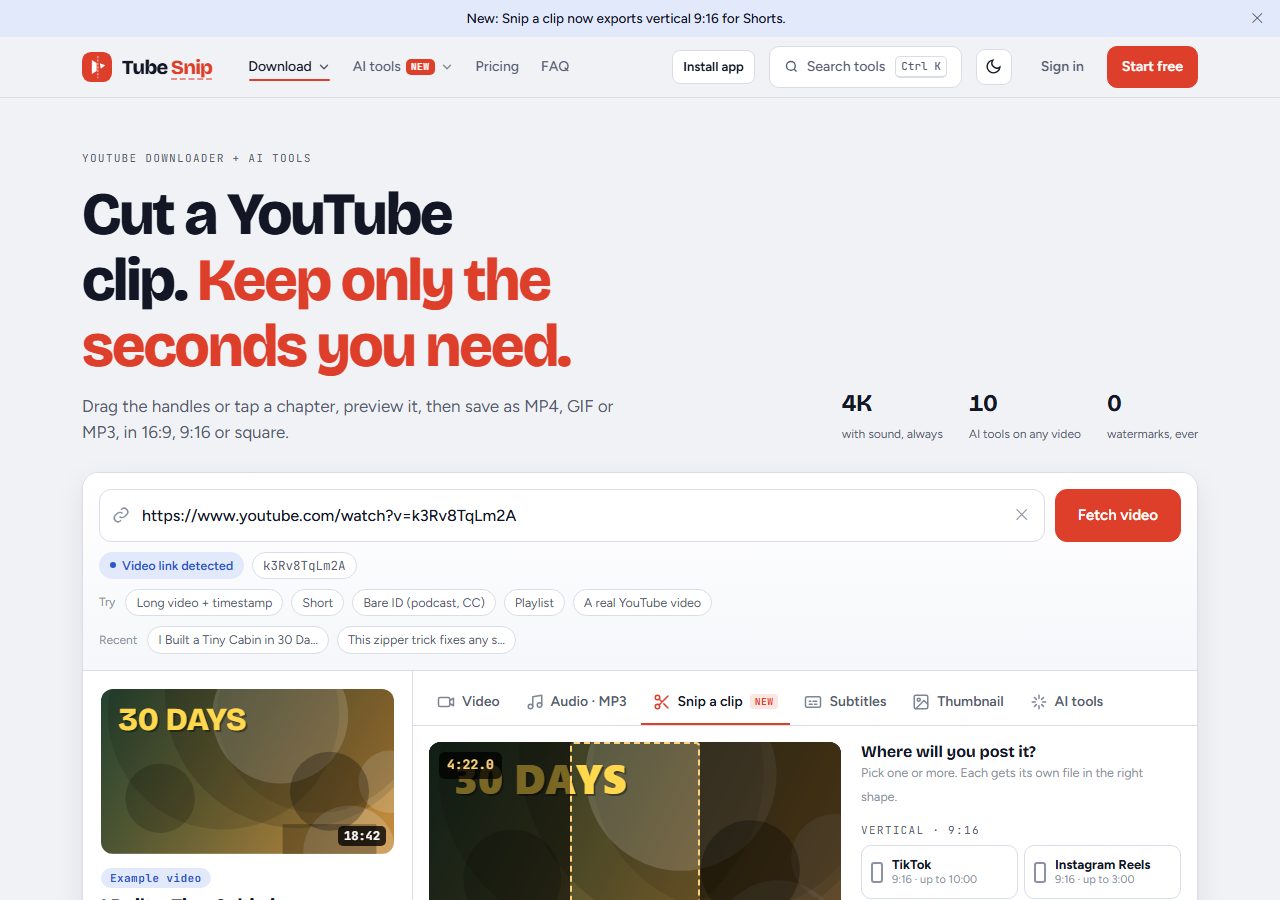
- Copy the video link. A link with a timestamp works too; the cutter starts right at that second.
- Paste it into the clip cutter and press Fetch video.
- Drag the two handles to the start and end you want. You can also tap a chapter, or press "Most replayed" when YouTube has that data, to jump to the part people watch most.
- Preview the part to check the first and last words.
- Pick the shape: 16:9 for a normal video, 9:16 for Shorts, Reels and TikTok, or square.
- Save it as MP4, GIF or MP3.
The free plan saves clips up to 60 seconds, which is the same length the old Clip button allowed. Paid plans remove that limit.
Our test: 30 seconds from a real video
We tested this on October 15, 2026, so you know what to expect. We used Big Buck Bunny, the Blender Foundation's open movie, which anyone may reuse under a Creative Commons license. We cut 0:30 to 1:00 twice.
| Original shape (16:9) | Vertical for Shorts (9:16) | |
|---|---|---|
| Time from Save to file ready | 50.8 seconds | 19.0 seconds |
| File | 1920 × 1080, 60 fps MP4 | 1080 × 1920, 60 fps MP4 |
| Size | 14.1 MB | 9.8 MB |
| Length | exactly 30.0 seconds | exactly 30.0 seconds |
Two things we noticed. Tube Snip only fetched the 30 seconds we picked, not the whole film. And the second version was much faster, because it reused the part it had already fetched and only changed the shape. Your times will depend on your connection and the video.
Which format to pick
- MP4 if you will post the part as a video, or edit it later.
- GIF for a short reaction or a moment to drop in a chat or a slide.
- MP3 if you only need the sound, for example a quote from a podcast. Our YouTube to MP3 tool also saves full-length audio.
If you want the whole video instead of a part, use the video downloader. For Shorts, the Shorts downloader keeps the vertical shape.
Making a clip for Shorts, Reels or TikTok
Many people used the Clip button to find a moment worth turning into a Short. Without it, the fastest way is:
- Find the moment with "Most replayed" or with the video's chapters. If the video has no chapters, the chapters generator can make them from the transcript.
- Keep it short. Most good clips are 15 to 45 seconds long.
- Choose 9:16 before you save, so you don't need to crop it again in another app.
- Add your own caption or voice. A clip with your own angle is more useful to viewers than a plain repost.
Use clips fairly
Cutting a clip doesn't change who owns the video. Clip videos you made, videos whose owner allows it, or short parts you use for commentary, teaching or review. Always credit and link the original creator. When in doubt, ask the creator first.
Quick summary
The YouTube Clip button is gone for viewers since April 2026. "Share at timestamp" only sets a start point. To get a part with a start and an end, saved as a file in the right shape, use a clip cutter. Ours is free for clips up to 60 seconds.
Questions
Why is the YouTube Clip button not showing?
YouTube removed the option for viewers to create new clips in April 2026. It is not a bug in your app or account. Clips made before the change still play.
What replaced YouTube Clips?
Share at timestamp. It makes a link that starts the video at a chosen second, but it has no end point and does not save a file.
Can I still clip a YouTube video for free?
Yes. Paste the link into the Tube Snip clip cutter, set a start and an end, and save it as MP4, GIF or MP3. The free plan saves clips up to 60 seconds.
Can I make a vertical clip for Shorts or TikTok?
Yes. Choose 9:16 before you save and the clip is framed vertically, ready for Shorts, Reels or TikTok.
Can creators still make clips?
Yes. Creators can clip their own videos and past live streams in YouTube Studio. The removal affects viewers clipping other people's videos.